
Stop Publishing Content That Nobody Finds
Content templates help plan the work before a word gets written. Learn why you should use them and how to set them up.

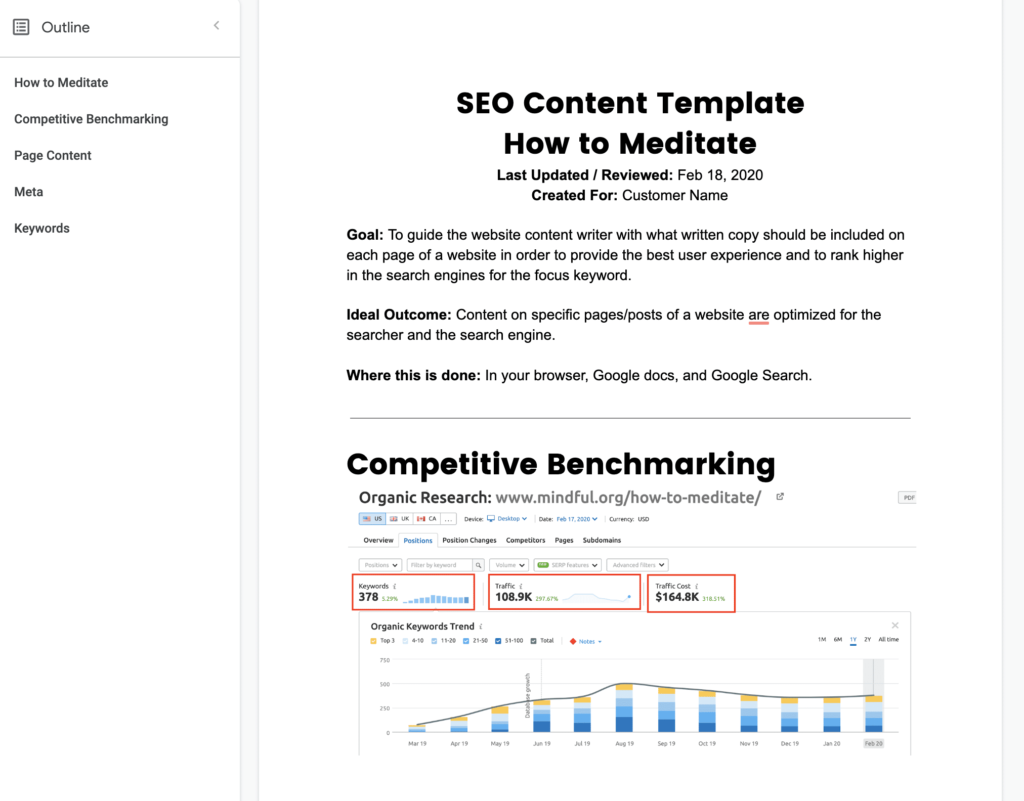
Most businesses publish content and then wonder why Google ignores it. Then whoever is in charge of marketing goes back to the content writer and wants to know why it didn’t rank. But it might not be the writer’s fault. Maybe there’s simply a lack of planning before writing ever begins.
An SEO content template fixes that. Think of it as a blueprint that tells your writers exactly what to cover, which keywords to target, and how to structure a page so it has a real shot at ranking. At Avalanche, we build one for every piece of content we produce, and it’s one of the first things we do when we take on a new client.
Here’s how it works.
What You’ll Need
- A Google Doc
- A keyword research tool (we use SEMRush)
- A keyword list you’ve already validated for your business
Not sure how to build a keyword list? Start there first. This process only works if you already know which terms are worth chasing. Read on to get started.
More of a visual learner? We got you.
Step 1: Find a Page Worth Beating
Pick a keyword you want to rank for. Search it in Google and find the top organic result—not an ad, not a map pack listing, the first actual website link.
Say you’re an HVAC company in Grand Rapids trying to rank for “AC repair Grand Rapids.” Click that top result, grab the URL, and drop it into SEMRush’s Organic Research tool.
You’re looking at four numbers:
- Keywords: How many search terms this page shows up for in Google’s top 100
- Traffic: Estimated monthly visitors from organic search
- Traffic cost: What that traffic would cost in Google Ads (a great proxy for how valuable it is)
- Top keyword: Which single term is driving the most traffic to that page
These four numbers tell you whether the page and the topic are worth competing for. If the traffic cost is high, advertisers are willing to pay for those clicks. That’s a strong signal the topic drives qualified leads, not just curious browsers.
Found a page worth beating? Let’s keep going.
Step 2: Find the Gaps
Pull up the full keyword list for the page you’re targeting and look for search terms they rank for but don’t fully address. This is a content gap analysis. Read their content through the eyes of a potential customer and ask: what did this page leave out?
Example: A competitor ranks for both “AC repair Grand Rapids” and “emergency AC repair Grand Rapids,” but their page never mentions emergency service, hours of availability, or response times. That’s a gap. Write toward it.
Drop your findings into a Google Doc. This becomes the foundation of your content template.
Step 3: Build the Template
Structure your Google Doc into four sections:
Competitive benchmarking: A screenshot and link to the competitor page you’re targeting, plus notes on what they do well and where they fall short.
Keywords: The validated list of search terms the writer should work in naturally. Not as a checklist to stuff, but as a map of how people actually talk about this topic.
Page content: The skeleton of the page itself. Start with your H1, then build out four to six H2s that cover the main themes of the topic. Break each H2 into subtopics as needed. Think of this less as an outline and more as a strategic brief.
Meta: The page title (under 60 characters) and meta description (under 160 characters) that will show up in search results. Write these before you write the page. They keep you honest about what the page is actually about.
Step 4: Put It to Work
Share the completed template with your writer, photographer, videographer, or whoever is creating content for this page. The template isn’t a cage. It’s a starting point. Writers should bring their voice to it.
A few things to keep in mind:
- Templates are living documents. Expect at least one revision before the first draft even starts
- More competitive topics require deeper templates. Don’t skimp on the benchmarking
- Some clients write raw answers directly into the Page Content section and have a writer polish it up. This works surprisingly well, especially for technical trades
Why This Works
Google ranks pages, not websites. That means every piece of content you publish is its own opportunity to show up in front of someone searching for exactly what you offer. A content template makes sure you don’t waste that opportunity.
Without one, writers are left to guess. They pick topics that feel right, structure pages based on instinct, and hope the keywords land somewhere useful. Sometimes they do. Usually they don’t. With a template, every page has a defined target, a clear structure, and a keyword strategy before the first sentence gets written. That’s what separates content that sits on your website collecting dust from content that pulls in qualified leads month after month, without you spending another dollar on ads.
Showing up for your ideal customer’s top searches is the result of deliberate planning, and the content template is where that planning lives.
Want to see how Avalanche builds content strategies our clients? Get in touch.
Ready to Get More Leads?
Schedule Intro Call