
UTM Codes 101: Tracking Digital Campaign Success
Learn how to track campaign success in Google Analytics using UTM codes. These generated URLs allow you to pinpoint referral traffic from the rest of the web!


Sharing your website’s content with the rest of the world is a critical step to gaining more traffic (and eventually, more leads). It’s always exciting to see those views on your latest blog post!
However, do you know where those clicks are coming from? Newsletters? Social media shares? Maybe another website linking to your awesome content?
This is where UTM codes come in. UTM codes allow you to track traffic and know exactly which channel your website visitors are coming from so you can double down on those promotional tactics!
What are UTM codes?
UTM stands for Urchin Tracking Module. UTM codes, also known as UTM parameters or UTM tags, are codes added to the end of links to help track referral traffic to your website.
We’ve already talked about using UTM codes when linking to your website from your Google My Business profile, but really, you should follow this process any time you’re linking to your website from anywhere on the internet.
Using UTM codes allows you to see how website visitors are getting to your website in Google’s Analytics tools. We’ll show an example of how these codes appear in GA in the next section.
How do you use UTM codes?
To build a UTM link, follow the steps below:
- Visit Google’s Campaign URL builder.
- Enter the target URL in the “Website URL” field.
- Enter the campaign source in the next field. This is the name of the website or email that the person clicking the link is coming from.
- Enter the campaign medium in the next field. This is the type of media that the link is, such as a call to action, banner, email, or social media post.
- Enter the campaign name in the last required field. This is the name of your campaign.
- Copy the generated URL in the box at the bottom of the page and paste it wherever you’d like to put your link!
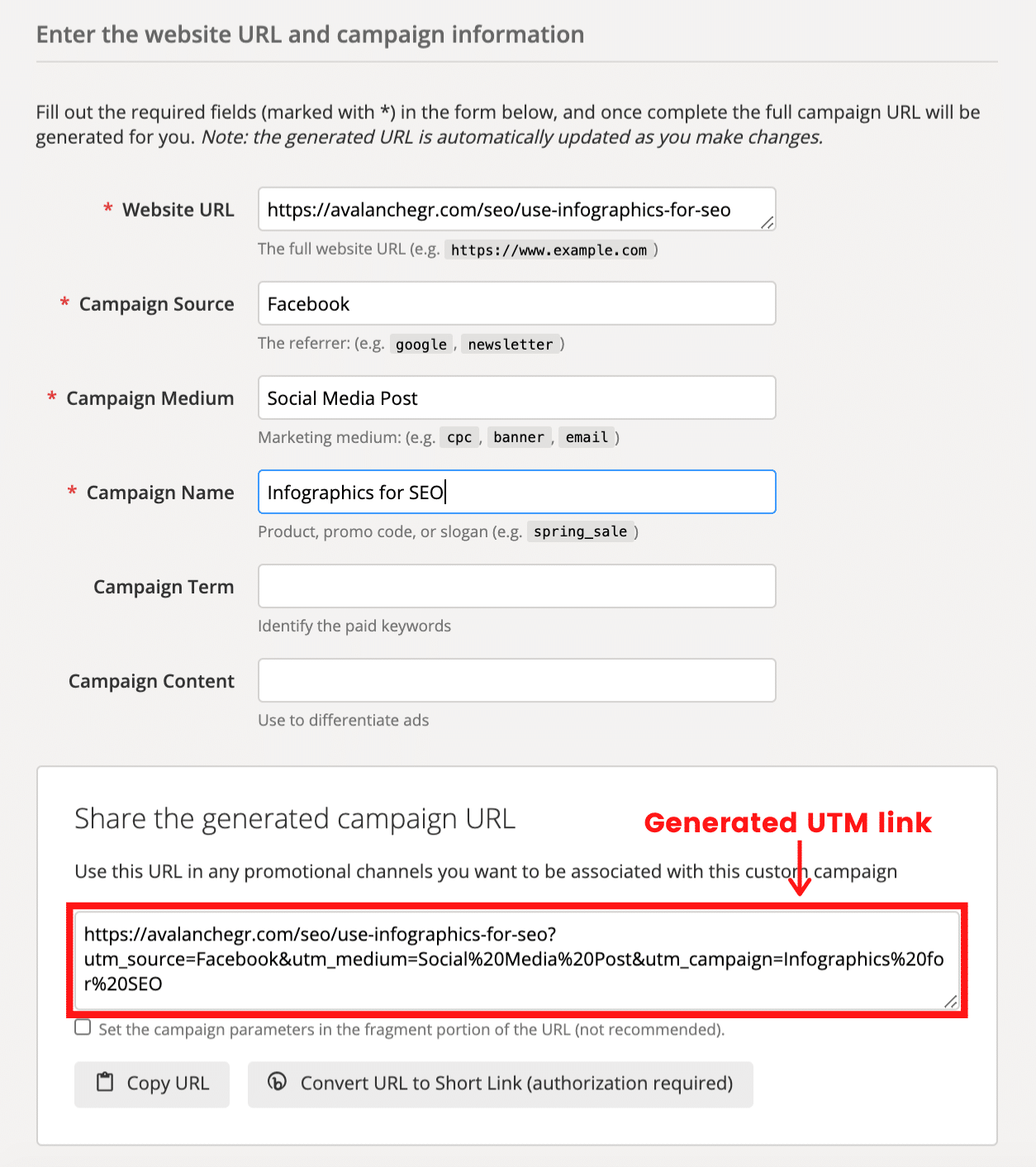
Once your UTM links have been clicked by website users, you’ll start to see them appear in your Google Analytics. Here is a screenshot of some examples.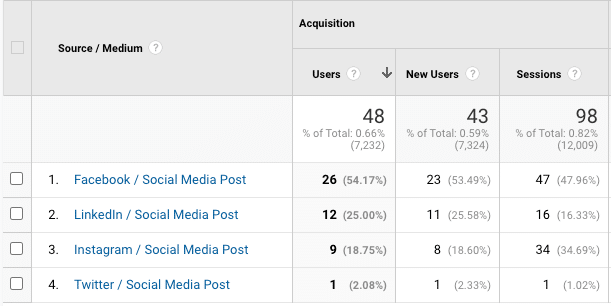
Why are UTM codes important?
UTM codes allow you to track the effectiveness of your digital marketing campaigns. Without these codes, you would not be able to segment your website traffic based on campaigns. Here are some things that UTM tags allow you to do:
- You can track the effectiveness of certain social networks for your marketing efforts.
- You can track traffic (and leads) that come from certain keywords in paid advertising campaigns.
- You can track clicks to your website from all or certain newsletter campaigns.
- You can segment your website traffic based on paid ad campaigns, organic search, referrals from other websites, or social media.
- You can narrow down digital marketing campaign metrics based on channel.
What are some best practices for UTM codes?
Here are some of our recommended best practices for creating and using UTM codes:
- It’s a good idea to build UTM links when you link to other websites, particularly if they are smaller sites or partnered companies of yours. This will help you build a great relationship!
- Stay consistent. Whether you decide to capitalize the names of your sources, mediums, and campaigns, just make sure it’s consistent so the same UTM terms group together.
- Along this same vein, use a consistent naming convention for your campaign parameters. That way, if you have a team of digital marketers creating UTM codes, everyone is on the same page with how to build them.
- If you’re pasting your link somewhere that isn’t a button (where the URL is visible), feel free to run it through a link shortener like bit.ly.
Now that you’re an expert on UTM tagging, make sure this process becomes second-nature in promoting your content on the web!
Get More Free Tips Today
If you love receiving free, no-strings-attached advice about SEO, just like this article, sign up for our weekly email!
Ready to Get More Leads?
Schedule Intro Call